Welcome to Kindergarten Music
E-Learning Resources

Resources: June 18th - June 23rd
HIGHLIGHTS of WEEK 12
-
This week we review steady beat, rhythm and pitch
-
Learn dance moves to a class favorite: “Jumpin’ Jacks”
-
See if you can identify rhythm and pitch patterns
-
Enjoy two read-alouds:
-
-
“Max has two sticks”
-
by Brian Pinkney
-
-
“Never play music right next to the zoo!”
-
by Max Lithgow
-
-
It has been my absolute pleasure to teach
each and every one of you this year!
WHERE?
Quavermusic
-
Log into Clever here
-
Click on the Quaver icon
-
Click on Assignments from the student dashboard
-
Launch kinder week 12


Resources: June 11th - June 17th
Peter and the Wolf
Three options:
-
Read-aloud book with Itzhak Perlman narrating
-
Video of a full orchestra with conductor as storyteller
-
Isolated audio tracks
-
Easily identify each character and instrument
-
-
Take the quiz
-
Check next week's newsletter to see if you're the high scorer
-
WHERE?
Quavermusic
-
Log into Clever here
-
Click on the Quaver icon
-
Click on Assignments from the student dashboard
-
Launch kinder week 11

Resources: June 5th - June 11th
Resources: May 28th - June 4th
HIGHLIGHTS
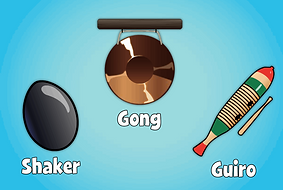
Week 10: Woodwind and percussion families
-
Hit, rattle and shake your way into the percussion family
-
What in the world is a rasping stick? Quaver explains!
-
Sing “The gong song!” and "Woodwind animals"
You might use the final slide to:
-
Sing or make some music
-
Share a drawing or project OR
-
Just say hi!
1. CLICK HERE to access Clever
2. Click on the Quaver icon
3. Go to the Assignments section of the dashboard
4. Launch Kinder_week 10 to see the slides

HIGHLIGHTS
Week 9: Using found sounds
-
Create a soundtrack to the story of “Bob the Bee”
-
Enjoy “The bumble bee queen” read-aloud
-
Fascinating facts about the secret life of honeybees
-
-
Listen to “The flight of the bumblebee”
-
Performed by two very large stringed instruments
-
Can you guess which instrument these might be?
-
It is the best part of my day to check the videos you submit!
You might use the final slide to:
-
Play your found sound for me
-
Share a drawing or project OR
-
Just say hi!
1. CLICK HERE to access Clever
2. Click on the Quaver icon
3. Go to the Assignments section of the dashboard
4. Launch Kinder_week 9 to see the slides

Resources: May 21st- May 27th
HIGHLIGHTS
Week 8: Found sounds
-
Create music where you might not expect to find it
-
Enjoy “Squeak, rumble, whomp! Whomp! Whomp!”
-
This read-aloud uses words to imitate sounds encountered on a busy day
-
-
See how film makers create sound effects from things you wouldn’t expect
-
Add your own sound effects to the story of “A mouse’s house.”
It is the best part of my day to check the videos you submit!
You might use the final slide to:
-
Play your found sound for me
-
Share a drawing or project OR
-
Just say hi!
1. CLICK HERE to access Clever
2. Click on the Quaver icon
3. Go to the Assignments section of the dashboard
4. Launch Kinder_week 8 to see the slides

Resources: May 14th - May 20th
HIGHLIGHTS
Week 7: Moving to sounds that are LONG and short!
-
Use long and short movements to help tell a story
-
Compose rhythm patterns and invent dance moves to match
-
Act out animals and categorize their sounds as long or short
-
Take a quiz and test your knowledge!
It is the best part of my day to check the videos you submit!
You might use the final slide to:
-
Show me long and short movements to go with a rhythm pattern
-
Share a drawing or project OR
-
Just say hi!
1. CLICK HERE to access Clever
2. Click on the Quaver icon
3. Go to the Assignments section of the dashboard
4. Launch Kinder_week 7 to see the slides
Resources: May 7th- May 13th
HIGHLIGHTS
Week 6: Sounds that are LONG and short!
-
Create long and short sound patterns using an electronic drum kit
-
Sing along with Ernie and Bert in “The opposites song”
-
Write new lyrics to the “Lunch box song” using long and short words, THEN
-
“Go bananas!” as you dance and sing with performers from The Learning Station.
It is the best part of my day to check the videos you submit!
You might use the final slide to:
-
Describe long and short sounds you’ve heard this week
-
Show me your latest project OR
-
Just say hi!
1. CLICK HERE to access Clever
2. Click on the Quaver icon
3. Go to the Assignments section of the dashboard
4. Launch Kinder_week 6 to see the slides

Resources: April 30th - May 6th
HIGHLIGHTS
Week 5 theme continues LOUD and quiet
-
Choose “just right” dynamics to go along with the story “Goldilocks and the three bears,” THEN
-
Listen to the read-aloud “Goldy Luck and the three pandas.”
-
Join in with Ernie and Bert as they sing about musical opposites.
-
Become an ear detective and move to show the dynamics you hear!
1. CLICK HERE to access Clever
2. Click on the Quaver icon
3. Go to the Assignments section of the dashboard
4. Launch Kinder_week 5 to see the slides

Quaver notes
Cash in and outfit your avatar, decorate your music room, etc. (Flash must be enabled)
-
Click on your Avatar on Quaver Street
-
Click the MY ACCOUNT tab
-
Enter the code where it reads ENTER QUAVERCODE
-
Boom-Chicka-Boom! You now have 100 QuaverNotes.
April: SpringIsHere
BONUS CODES:
MusicAtHome - 200 QuaverNotes
MusicAtHome400 - 400 QuaverNotes
MusicAtHome500 - 500 QuaverNotes
As a reminder, QuaverNotes will NOT expire.
Resources: April 23rd -29th
HIGHLIGHTS
Week 4 theme is LOUD and quiet
-
A greeting from Ms. Caulton and Winston
-
Classical music and creative movement – show dynamics with your body!
-
Caspar Babypants sings “Loud and quiet.”
-
Identify sounds as loud or quiet in an interactive game
-
Use the final slide to say hello, sing, or show off a project.
1. CLICK HERE to access Clever
2. Click on the Quaver icon
3. Go to the Assignments section of the dashboard
4. Launch Kinder_week 4 to see the slides

Resources: April 10th -17th
Launch a play-list of new and old animated songs in your student's Quaver account.
Previous week's activities available all year!
-
Log onto Clever: Click here
-
Click Quaver icon
-
Go to Dashboard (Visual guide to Quaver)
-
Click Assignment icon
-
Select Sing-Along Songs
FAVORITES PLAYLIST
These songs are animated if accessed through your student's Quaver assignment: "Sing Along Songs"
Week 3: April 3- April 10
Kinder_week3
Highlights:
-
Sing the Kangaroo song
-
Watch baby Joeys learn to hop
-
Launch a Jungle read-aloud book
-
Play Quaver games
-
Meet my pup Peppe
-
Send me a video of YOU!
How?
-
Log onto Clever: Click here
-
Click Quaver icon
-
Go to Dashboard (Visual guide to Quaver)
-
Click Assignment icon
-
Select Kinder_week3

Week 2: March 27-April 3
Kinder_Activities_week2
QuaverMusic slide show
Every Friday I'll post a video greeting and Quaver activities.
How?
-
Log onto Clever (instructions)
-
Click Quaver icon
-
Go to Dashboard (Visual guide to Quaver)
-
Click Assignment icon
-
Select Kinder_Activities_week2
Other Quaver activities to try this week:
Visit "Student Interactives" from the dashboard
-
Instrument Crane
-
In the "Instrument and knowledge" section
-
Try without pictures!
-
-
Body Percussion dance
- In the "Movement section"
-
Use Quaver's soundtrack, then choose new music and keep dancing!
Week 1: March 22-26
Spring tune play list
Your young musicians will recognize the first few songs.
I've added several more to celebrate the coming of spring!
The very quiet cricket
by Erik Carle
A little cricket has lost his song! Follow him as he sets off to find his voice and meets creatures who make all kinds of noises. One day he meets a special friend and discovers how to make 'the most beautiful sound you have ever heard.'
Questions to follow the story:
-
What do you hear when you listen to the outdoors?
-
Do you hear different things at different times? (morning, afternoon, evening)?
-
Can you describe what you hear?
-
Use our Word Wall words!
-
Steady beat? Yes/No
-
Pitch (high/low)
-
Tempo (fast/slow)
-
Dynamics (loud/quiet)
-
-